
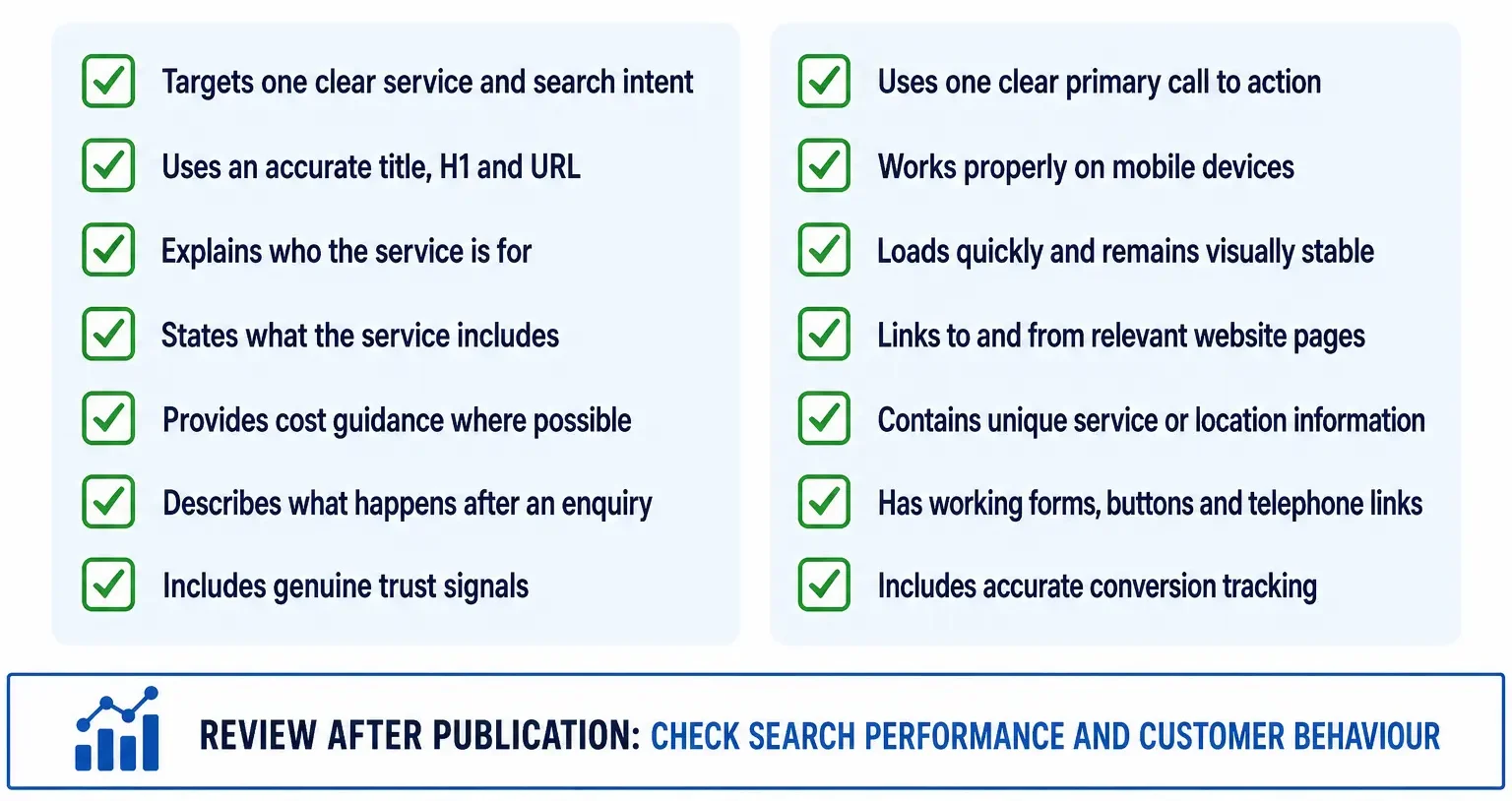
A service page can be indexed, technically clean and professionally designed and still sit nowhere useful in Google.
When that happens, the instinct is usually to add more keywords or another thousand words. That is often the wrong first move.
A service page has to do two jobs at once. It has to match the search intent strongly enough to compete, and it has to help a real buyer understand what the service is, whether it fits their problem, what it costs, why they should trust you and what happens next.
If either side is weak, the page can struggle.
Before rewriting a service page, check whether Google actually wants a service page for that query.
Then compare your page against the current top results on intent, offer clarity, pricing or buying information, proof, internal support, local relevance and technical quality. More words only help when they close a real gap.
1. Search the target query and inspect the page type Google ranks
This is the most important check because the wrong format can fail no matter how polished it is.
Search the exact phrase the page is meant to rank for.
Look at positions one to three and ask:
- Are they service pages?
- Are they homepages?
- Are they local landing pages?
- Are they comparison articles?
- Are they directories?
- Are they guides or support articles?
- Does a map pack dominate the result?
If Google mainly ranks educational guides, a sales page may be the wrong asset.
If Google ranks provider pages full of pricing, process, proof and service detail, a 600-word generic service description will probably be too weak.
2. Make sure the page targets one clear commercial intent
Some service pages try to do too much.
A page called “Digital Marketing Services” may briefly mention SEO, Google Ads, social media, websites, email marketing and branding. It technically covers six topics and is strong for none of them.
When customers search for a specific service, they usually need a page dedicated to that service.
The deeper service-page SEO guide covers how commercial intent should shape page structure from the beginning.
3. Check whether the page has a clear offer
A service page should not merely discuss a topic. It should explain what the business actually does.
A visitor should quickly understand:
- what the service is;
- who it is for;
- which problems it solves;
- what is included;
- where it is available;
- how to get started.
Headings such as “Innovative Solutions for Modern Businesses” may sound polished, but they are poor at communicating a specific offer.
4. Answer the questions buyers ask before contacting you
Service pages often underperform because they are written like brochures rather than buying pages.
Useful questions include:
- What exactly is included?
- How much does it cost?
- Is there a starting price or typical range?
- How long does it take?
- What is the process?
- Who is it suitable for?
- What is not included?
- What do I need to provide?
- What happens after I enquire?
- What happens if something goes wrong?
You do not need to publish a fixed price when the service genuinely varies, but silence is not always the best answer. Explaining what drives the cost can still help. Our website pricing guide explains when fixed prices, ranges and starting prices make sense.
5. Compare your page against positions 1, 2 and 3
Do not use a generic checklist. Compare the real pages Google currently prefers.
Record:
- their H1 and title pattern;
- how they open;
- what buying questions they answer;
- whether they show prices;
- whether they show a process;
- what proof they use;
- what local evidence they include;
- how long and detailed they are;
- their FAQs;
- what they fail to explain.
Your page should cover the useful ground the strongest competitors cover and then add something materially better.
6. Do not confuse word count with depth
A 3,000-word service page can still be weak if half of it is generic explanation.
A 1,200-word page can be strong if it clearly answers every important commercial question.
Depth means useful coverage, not length for its own sake.
That said, if every top-ranking page answers pricing, process, service areas, objections, proof and FAQs and yours answers only “what we do”, the missing depth is real.
7. Check whether one generic services page is holding everything back
One common structure is:
Services → one page → eight short service descriptions.
That is often fine for navigation and poor for organic search.
If people independently search for:
- WordPress maintenance;
- website redesign;
- local SEO;
- technical SEO audits;
those may need separate, genuinely useful commercial pages.
The key is distinct intent. Do not create five pages for five synonyms of the same service.
8. Check for cannibalisation
Your own site may be competing against the page.
Search Console can show several URLs receiving impressions for the same commercial query.
That is not automatically a problem, but inspect whether the pages have different jobs.
A site might reasonably have:
- an SEO services page;
- a local SEO service page;
- an SEO cost guide;
- an article explaining what an SEO agency does.
Those can coexist if the intent is clear.
What causes trouble is having:
- SEO services;
- SEO company;
- SEO agency;
- SEO consultant;
as four near-identical pages all trying to rank for the same commercial query.
9. Check which page Google currently prefers
If another page on your site ranks instead of the intended service page, do not keep adding text blindly.
Ask why Google prefers the other URL.
It may have:
- more internal links;
- stronger external links;
- a clearer title;
- older history;
- better intent alignment;
- more useful content.
Then strengthen the intended destination and reduce mixed signals where appropriate.
10. Check internal links to the service page
Important commercial pages should not sit like islands.
Relevant internal links can come from:
- main navigation;
- the services hub;
- homepage sections;
- location pages;
- related guides;
- case studies;
- comparison articles.
Anchors should fit the surrounding sentence naturally. Avoid forced exact-match links repeated everywhere.
11. Check whether the page is buried too deeply
If the service is commercially important, it should not require five clicks from the homepage to reach it.
Site architecture communicates priority as well as helping users navigate.
12. Check whether supporting content actually supports the service
Publishing ten blog posts does not automatically strengthen a service page.
The supporting articles need distinct informational jobs and natural links back to the commercial destination.
For example, a WordPress maintenance page might be supported by articles about:
- maintenance costs;
- backup schedules;
- update frequency;
- staging sites;
- maintenance plans;
- what happens when WordPress is not maintained.
Those should educate first and support the service page naturally rather than becoming competing sales pages.
13. Check local intent separately
If the query includes a city, town or “near me”, the page needs credible local relevance.
That can include:
- real service coverage;
- projects in the area;
- reviews;
- response details;
- business information;
- local imagery;
- neighbourhood or area context where useful.
Changing the city name in a template is not the same as demonstrating local relevance.
14. Check whether the page matches the Google Business Profile
For local services, the profile and landing page should make sense together.
If a GBP category and service emphasise one thing while the landing page barely mentions it, the alignment is weak.
15. Check the title and H1 pattern in the current SERP
If the top results consistently use direct service-led titles, there is little benefit in choosing a vague creative heading.
A title should tell the searcher exactly what the page offers.
16. Check proof on the page itself
Many service pages assume trust lives elsewhere on the website.
But a customer deciding whether to enquire should not have to hunt for reasons to believe the claim.
Useful proof can include:
- case studies;
- real project examples;
- before-and-after evidence;
- customer reviews;
- certifications;
- years of relevant experience;
- screenshots;
- specific outcomes;
- real team information.
17. Use specific claims rather than generic adjectives
“Professional”, “high-quality”, “bespoke” and “results-driven” appear on thousands of service pages.
Specifics are more useful.
Instead of:
We provide high-quality WordPress maintenance tailored to your business.
a page might explain:
Updates are tested on staging first, backups are checked before major changes, and forms, uptime and payment journeys are monitored after updates.
The second version gives the reader something concrete to evaluate.
18. Check whether price information would improve the page
Price is one of the strongest commercial questions for many services.
Where possible, provide:
- a fixed price;
- a starting price;
- a range;
- the factors that change the quote.
Hiding all price information does not automatically produce better leads.
19. Explain the process
People are often more comfortable enquiring when they understand what happens next.
A useful process section might show:
- initial enquiry;
- review or audit;
- proposal;
- delivery;
- testing;
- ongoing support.
20. Explain limitations honestly
Pages can build more trust when they explain who the service is not for or what it does not include.
That helps customers self-qualify and makes the page sound less like advertising copy.
21. Check mobile conversion
A page can rank and still waste the traffic.
On a real phone, test:
- call buttons;
- forms;
- sticky bars;
- menus;
- loading speed;
- pop-ups;
- pricing tables;
- accordions.
22. Check technical SEO, but do not blame technical SEO for everything
A service page still needs:
- a 200 response;
- indexability;
- correct canonical;
- internal links;
- a sitemap entry where appropriate;
- mobile usability;
- stable rendering.
The technical SEO audit checklist helps rule out those issues.
But if the page is indexed, crawlable and technically fine, installing another SEO plugin is unlikely to solve weak intent or weak content.
23. Check the queries already generating impressions
Search Console can show whether Google understands the page the way you intended.
If the page is meant to rank for “WordPress maintenance London” but impressions are mainly for “what is WordPress maintenance”, the page may be leaning too informational.
If impressions are for the right commercial queries but positions sit at 40–60, the intent may be right and the competitiveness weak.
24. Check CTR only after the page has meaningful positions
A low click-through rate at position 70 is not useful.
A low CTR at position 4–8 can indicate that the title, snippet, brand or offer is less compelling than surrounding results.
25. Check whether the service is too broad
“Marketing services” is harder to rank and harder to buy than “Local SEO for service businesses”.
A clearer service definition can improve both search intent and conversion.
26. Check whether the target phrase is too competitive
A well-written page on a small new site may still struggle against large, established competitors.
That does not automatically mean the page needs rewriting.
The strategy may need:
- narrower commercial queries;
- local focus;
- supporting content;
- links;
- case studies;
- time.
27. Check whether the page is genuinely differentiated
If the page could belong to any competitor after changing the logo, it is probably too generic.
Add details only your business can provide:
- your process;
- your service limits;
- your project examples;
- your pricing structure;
- your response time;
- your experience;
- your guarantees where genuine;
- the tools or methods you actually use.
28. Check whether the page is stale
For services involving current software, regulation, prices or platform changes, outdated details weaken trust.
Update useful information rather than merely changing the “last updated” date.
29. Do not rewrite the whole page every week
Search performance moves.
Make considered improvements based on evidence, then give search engines time to recrawl and reassess them.
Constant title changes and large weekly rewrites make it difficult to learn what actually helped.
30. Decide what kind of fix the page needs
After the diagnosis, choose one path.
Improve
The intent is right, but competitors answer the buyer better.
Consolidate
Two or more pages are competing for the same commercial job.
Retarget
The page naturally fits a narrower or different service query.
Replace the page type
The SERP wants a different format entirely.
Leave it alone and build authority
The page is strong, but the site lacks the trust and support to compete yet.
A practical service-page ranking checklist
Intent: Does Google rank service pages for the query?
Offer: Is the service obvious within seconds?
Buying information: Price, process, timescale, scope, next step?
Proof: Why should a customer trust this business?
Local relevance: Is the location claim real and evidenced?
Internal support: Does the rest of the site reinforce this page?
Cannibalisation: Is another URL competing for the same job?
Technical health: Can Google crawl and render it cleanly?
Competition: Does it actually beat the top three on usefulness?
When should you create a new service page?
Create one when there is a genuinely distinct service intent that customers search independently and the business has enough useful information to support the page.
Do not create another page simply because a keyword tool shows a synonym.
How long should a service page be?
Long enough to answer the commercial questions properly.
Some simple services can be explained well in 800 words. Complex services may need 2,000 words or more.
The useful benchmark is the information gap, not the word counter.
Should service pages include FAQs?
Yes when they answer genuine pre-sale questions.
Do not add twenty generic questions just to make the page longer.
Should service pages show prices?
Where possible, price guidance can improve usefulness and lead quality.
If a fixed figure is impossible, explain the starting price, typical range or the variables that affect the quote.
How Core Web UK approaches underperforming service pages
Our SEO audit process looks at the page and the surrounding cluster together rather than assuming the fix is another keyword edit.
Where the issue is broader, our SEO services for UK businesses focus on strengthening the commercial pages that should generate leads.
Frequently asked questions
Why is my service page indexed but not ranking?
Usually because indexing is not the problem. Check search intent, competitor quality, internal links, cannibalisation, authority and commercial usefulness.
Should every service have its own page?
Only when the service has distinct search intent and enough meaningful information to justify a dedicated page.
Will adding more text help?
Only when the new content closes a real information gap. Filler does not fix weak intent or weak proof.
Can internal links improve a service page?
Yes. Relevant contextual links can strengthen the page’s role in the site architecture and help users discover it.
Why is my blog post ranking instead of my service page?
The blog may currently match Google’s understanding of the query better or have stronger links. Check whether the query is really commercial and strengthen the service page’s internal and topical signals.
Should I change the URL?
Usually not just because the page is underperforming. Improve the existing URL unless there is a strong structural reason to change it.
When the page matches the SERP, answers the buyer’s real questions, shows proof and is properly supported by the rest of the site, ranking work has something worth amplifying.
A 15-minute triage before you touch the copy
Current ranking pages on this topic increasingly treat the problem as a diagnosis rather than a writing exercise. That is the right approach.
- Search the target query. Confirm Google actually ranks service pages.
- Check which URL from your own site is receiving impressions. If it is not the intended service page, investigate cannibalisation first.
- Compare the top three. Note page type, pricing, process, proof, local evidence, FAQs and title pattern.
- Check internal links. A service page with no contextual support is structurally weak.
- Check the offer. If a buyer cannot tell what is included, more SEO text will not fix the page.
- Check local relevance where the query is local. Real projects and service evidence matter more than town-name repetition.
- Only then decide whether the page needs more content.
Why the homepage sometimes ranks instead of the service page
This is common on small-business websites.
The homepage often has:
- more backlinks;
- more internal links;
- stronger brand signals;
- older history;
- broader service language.
If the homepage ranks for a service query while the dedicated page sits much lower, do not immediately delete or redirect the service page. First strengthen the service page’s unique commercial role and link to it naturally from the homepage, related guides, case studies and relevant location pages.
Why a service page can rank for the wrong queries
A page written too educationally can start appearing for informational searches while failing on commercial ones.
For example, a page meant to sell website maintenance might spend 1,500 words explaining what WordPress is, what plugins are and why updates matter, while barely explaining:
- what the plan includes;
- response times;
- what happens when something breaks;
- pricing;
- backup and staging process;
- who handles urgent support.
Search Console query data often exposes this mismatch.
How much local evidence is enough?
There is no required number of town mentions, projects or testimonials.
The useful test is whether a buyer in the target area can see evidence that the business genuinely serves that market.
One detailed real project can be stronger than twenty generic mentions of the town name.
Should you rebuild the page or improve the existing URL?
Keep the existing URL when it already has history, impressions, backlinks or internal equity and the intent is still correct.
Rewrite or rebuild the page on the same URL when the content or design is the problem.
Create a different URL only when the new page serves a genuinely different search intent.
