

A good local business website needs focused service pages. A good service page has two jobs. It must help the right people find your business in Google and give them enough confidence to contact you.
Many service pages achieve only one. Some attract traffic but generate few enquiries because the offer is unclear. Others look attractive but receive little organic visibility because they do not match how customers search.
Landing page SEO brings these goals together. It connects a specific service with clear search intent while making it easy for visitors to request a quote, book an appointment or call the business.
This guide explains how small businesses can create focused service pages that rank and convert without repetitive keywords, empty sales language or unnecessary content.
What Is Landing Page SEO?
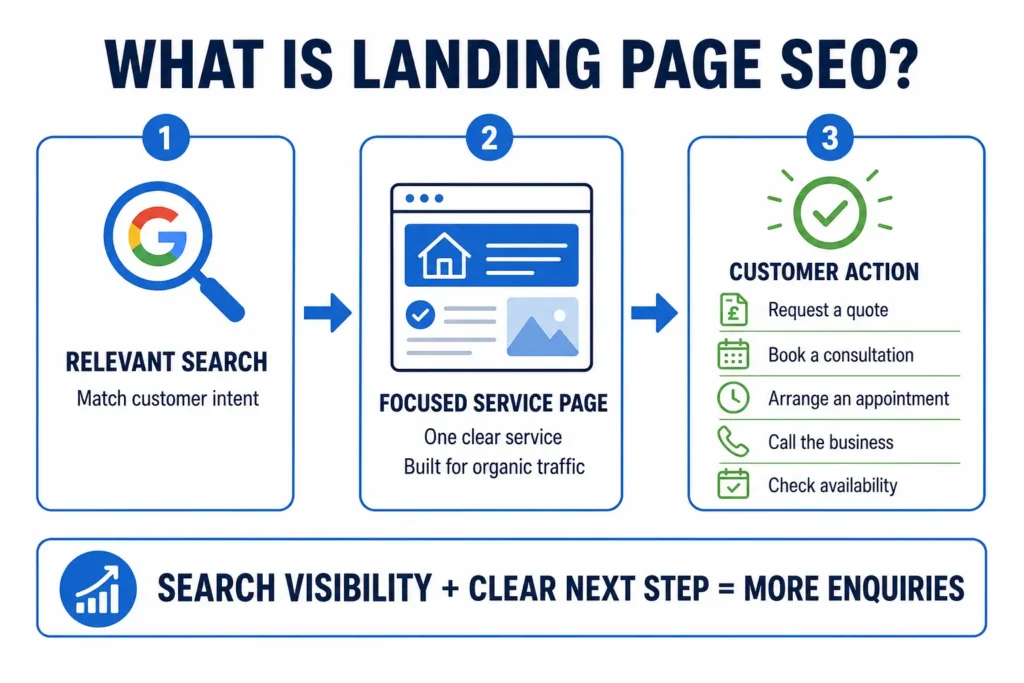
Landing page SEO is the process of optimising a focused webpage so it can appear for relevant searches and encourage visitors to take a specific action.
For a service business, that action might be:
- Requesting a quote
- Booking a consultation
- Arranging an appointment
- Calling the business
- Checking availability
An organic service page differs from a temporary advertising landing page. It normally forms part of the main website, receives internal links and remains available to attract search traffic over time.
A web design company, for example, might create separate pages for web design, ecommerce development, WordPress support and technical SEO audit checklist. Each page answers a different customer need and targets a distinct search topic.
Does Every Service Need a Separate Page?
Each important and genuinely distinct service should normally have its own page.
Placing several unrelated services on one page makes it difficult to explain any of them properly. It can also leave Google uncertain about which searches the page should appear for.
A building company may therefore use separate pages for:
- House extensions
- Loft conversions
- Kitchen renovations
Someone searching for a loft conversion company can then land directly on a page explaining that service, its cost, the process and relevant completed projects.
Do not create a new page for every minor variation. Several thin pages with almost identical content can weaken the website and frustrate visitors. A service deserves its own page when it addresses a different need or requires substantially different information.
Start With the Customer’s Search Intent
Search intent is the reason behind a search.
Someone searching for “how much does a loft conversion cost?” is probably gathering information. Someone searching for “loft conversion company Croydon” is more likely to be comparing providers or preparing to make an enquiry.
The first query may suit a helpful guide. The second requires a commercial service page.
Before building a page, search the main phrase and examine the results. Look at whether Google mainly displays:
- Local service pages
- Business directories
- Product pages
- Guides and articles
- Location pages
- Videos
The results provide clues about what people expect to find. They should inform the type of page you create, although they should never be copied.
Choose one primary service for each page. Supporting topics should help customers evaluate that service rather than pull the page in several directions.
For an emergency electrician page, useful supporting information might include availability, areas covered, common electrical problems, expected response times, call-out charges and professional qualifications.
There is no need to repeat the exact keyword in every section. Clear, natural language is more useful than awkward phrases written solely for search engines.
Should a Service Page Target a Location?
Include a location when the business genuinely serves that area and customers commonly search locally.
A service page targeting Croydon could demonstrate local relevance through:
- A genuine business address or service area
- Local projects and case studies
- Reviews from Croydon customers
- Typical response or travel times
- Original local photographs
- Accurate contact details
Adding a town name to the title is not enough on its own. The page should provide evidence that the business operates in or serves that location.
Avoid publishing dozens of pages that simply replace one town name with another. Pages for Croydon, Bromley and Sutton should contain meaningful local information rather than the same generic paragraphs.
Location pages can be helpful when the service, customer evidence, operating details or local knowledge genuinely differ. Otherwise, one strong service-area page may be the better option.
What Should a High-Converting Service Page Include?
A strong service page answers customer questions in the order they are likely to arise.
A practical structure is:
- A clear service-focused headline
- A short explanation of the offer
- A primary call to action
- Details of what the service includes
- Benefits relevant to the customer
- Prices or cost guidance
- An explanation of the process
- Reviews, case studies or qualifications
- Frequently asked questions
- A final call to action
The structure can change according to the service. An emergency locksmith needs a prominent telephone number and immediate availability information. A commercial web design page may require a portfolio, detailed process and consultation form.
The objective is not to follow a rigid template. It is to remove the questions and uncertainties that might stop a suitable customer from getting in touch.
What Should Visitors See First?
The top of the page should immediately confirm the service, intended customer and next step.
It should normally contain:
- One clear H1 heading
- A short service description
- A meaningful customer benefit
- One primary call to action
- A relevant image or trust signal
For example:
Web Design Services in Croydon
Fast, mobile-friendly websites for local businesses that need more enquiries from Google.
Request a consultation
This is clearer than an opening such as “Transforming digital possibilities”. Visitors should not have to interpret marketing language before discovering what the business provides.
The H1 can include the service and location where appropriate. Keep it readable:
Emergency Electrician in Croydon
Avoid headings packed with variations:
Croydon Electrician, Electrical Services and Emergency Electricians Croydon
The SEO title and H1 do not need to match exactly, but they should describe the same service.
Write for Customer Decisions
Helpful service content answers the questions a customer needs to resolve before making an enquiry:
- What is included?
- Who is the service for?
- What problem does it solve?
- How does the process work?
- How long could it take?
- What might it cost?
- Why should the customer trust this provider?
- What happens after an enquiry?
Be specific. Instead of writing:
We provide high-quality digital solutions tailored to your needs.
Explain the actual service:
Our small-business web design service includes page planning, responsive design, WordPress development, contact-form setup, basic on-page SEO and pre-launch testing.
The second version helps customers understand what they would be buying.
Discuss outcomes without making promises you cannot support. “Designed to make enquiries easier” is more credible than “guaranteed to double your sales”.
The page should be long enough to answer relevant questions, but no longer. A window-cleaning service may require much less explanation than commercial legal advice. Word count should follow customer need, not an assumed SEO target.
Should You Show Service Prices?
Include a fixed price, starting price or realistic cost guidance when possible.
Price is often one of the customer’s biggest questions. Complete secrecy can cause visitors to leave for a competitor that provides more useful information.
If the final cost depends on the project, explain:
- The typical range or starting price
- What affects the quotation
- What the price includes
- Whether VAT is included
- Whether the initial consultation is free
For example:
Small-business website projects start from £X. The final price depends on the number of pages, required functionality, content support and third-party integrations. We provide a written quotation before work begins.
Do not publish a misleading low price simply to attract clicks. If the business needs to inspect the work before quoting, explain why and tell the customer how to request an assessment.
Explain What Happens After Contact
A simple process reduces uncertainty and makes the service easier to buy.
A web design process might include:
- Initial consultation
- Requirements and quotation
- Content and page planning
- Design and development
- Review and testing
- Launch and support
An emergency service may require only three steps: call the business, explain the problem and receive an estimated arrival time.
Keep the process accurate. Customers need to understand what happens next, not read a detailed description of the company’s internal workflow.
Include realistic timescales where possible. If timings depend on the project, explain the main factors that can affect them.
Add Evidence That Customers Can Trust
A service page should support its claims with relevant evidence.
Useful trust signals include:
- Genuine customer reviews
- Relevant case studies
- Professional qualifications
- Trade memberships
- Insurance details
- Guarantees or warranties
- Original project photographs
- Clear business and contact details
Choose evidence that matters for the service. Gas Safe registration is important when hiring a heating engineer. A portfolio is more useful when choosing a web designer. Professional insurance and qualifications may influence someone selecting an accountant or consultant.
Reviews should relate to the service on the page. A detailed review about a completed loft conversion is more persuasive than a general comment saying the company was helpful.
Identify the source of third-party ratings and keep changing review counts accurate. Do not edit a customer’s words in a way that changes their meaning.
A short case study can explain the customer’s original problem, the work completed and the outcome. Only publish measurable results when they can be verified and presented with proper context.
Use Clear Calls to Action
A call to action tells the visitor what to do next.
Good examples include:
- Request a quote
- Book a consultation
- Check availability
- Arrange a site visit
- Call for emergency help
Avoid vague labels such as “Submit”, “Click here” or “Get started”. The button should remain understandable without the surrounding text.
Place the primary call to action near the top and repeat it after important decision-making sections, such as prices, case studies or FAQs.
Do not place a large button after every paragraph. Too many prompts can make the page feel aggressive.
Choose one main conversion goal. If the purpose is to generate quotation requests, that action should receive the greatest visual emphasis. A telephone number can remain available as a secondary option.
For urgent services, calling may be the primary action. Make the number clickable on mobile devices and state operating hours accurately.
Keep Enquiry Forms Simple
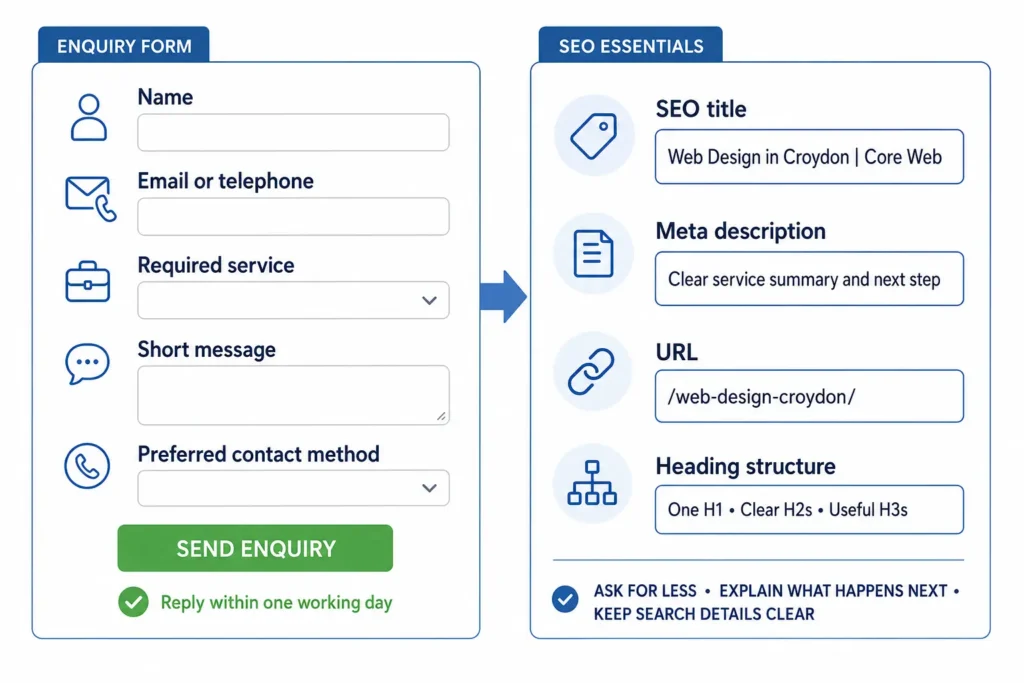
Only request information the business genuinely needs to respond.
A basic form may ask for:
- Name
- Email address or telephone number
- Required service
- Short message
- Preferred contact method
Complex projects may require more detail, but every additional field creates another opportunity for the visitor to leave.
Tell people what will happen after submission:
Send us your project details and we will respond within one working day to arrange an initial conversation.
Only promise a response time the business can consistently maintain.
Test the form regularly. Confirm that submissions arrive, error messages are clear and customers do not lose completed information when correcting a field.
Optimise the Main SEO Elements
The title, URL and headings should make the subject of the page easy to understand.
A simple SEO title format is:
Web Design in Croydon | Core Web
Keep the primary service near the beginning. Do not fill the title with several locations or keyword variations.
The meta description should summarise the service and encourage a relevant click:
Core Web creates fast, mobile-friendly websites for small businesses in Croydon. Request a consultation for a new website or redesign.
Use a short, readable URL:
/web-design-croydon/
Avoid unnecessary dates, numbers and complicated folder structures.
Changing an established URL purely to make it slightly shorter is rarely worthwhile. If a live URL must change, redirect the old address to the most relevant replacement.
Use headings to organise the content:
- One H1 for the main service
- H2s for major questions and sections
- H3s where a section genuinely needs further division
Headings should help readers scan the page. They do not all need to contain the target keyword.
Build Useful Internal Links
Important service pages should be easy to reach from the homepage, navigation or main services page.
They can also receive relevant internal links from:
- Blog articles
- Case studies
- Location pages
- Related services
- Frequently asked questions
Use descriptive link text. “Explore our technical SEO audit service” provides more context than “click here”.
Internal links should also help the visitor continue their journey. A guide about website speed can link to a technical SEO service page, while the service page can link to a detailed speed guide for visitors who want more information.
Avoid adding links where they do not support the reader’s next question or action.
Use Structured Data Carefully
Structured data helps search engines interpret business information. It does not guarantee higher rankings or enhanced search results.
Relevant types may include:
LocalBusinessOrganizationServiceBreadcrumbList
Business markup can contain details such as the company name, address, telephone number, opening hours, service area and website.
The markup must match information visible to visitors. Do not add services, reviews, ratings or locations that the page cannot support.
FAQs should be included because they help customers, not solely to obtain a larger search result. Google shows FAQ rich results in limited circumstances, so enhanced visibility should not be the main reason for adding them.
Make the Page Work on Mobile
Many potential customers will visit the service page using a phone. They should be able to understand the offer and make contact without zooming or struggling with small controls.
Check that:
- Text is easy to read
- Buttons are large enough to tap
- Telephone numbers are clickable
- Forms are simple to complete
- Menus work properly
- Images fit the screen
- Pop-ups do not cover important content
- The layout does not jump while loading
Test the page on a real phone. Complete the form, tap the telephone number and check every important button.
A desktop preview is not enough. Real-device testing can reveal keyboard problems, difficult form fields, overlapping buttons and other issues that are easy to miss during design.
Improve Speed and Core Web Vitals
A slow service page can lose a customer before the offer appears.
Google’s Core Web Vitals assess three aspects of page experience:
- Largest Contentful Paint: how quickly the main content loads
- Interaction to Next Paint: how quickly the page responds
- Cumulative Layout Shift: how much the layout moves unexpectedly
Common service-page problems include:
- Oversized hero images
- Autoplay videos
- Heavy sliders
- Too many tracking or chat scripts
- Poor font loading
- Slow hosting
- Images without defined dimensions
Compress images, remove unnecessary scripts and test the page under realistic mobile conditions.
Strong technical performance cannot rescue irrelevant content. Equally, helpful content may fail to convert when the page is frustrating to use. A successful service page needs both.
Avoid These Service-Page SEO Mistakes
Common mistakes include:
- Targeting several unrelated services on one page
- Repeating the same keyword unnaturally
- Publishing nearly identical location pages
- Writing vague descriptions that omit what is included
- Hiding all pricing information without explanation
- Using reviews that cannot be verified
- Making unsupported ranking or sales guarantees
- Providing no clear next action
- Using long forms for simple enquiries
- Allowing large images or scripts to slow the page
- Leaving important service pages without internal links
Do not judge a page only by whether it contains a keyword. Ask whether it gives a suitable customer enough information and confidence to make contact.
How Should You Measure Service-Page Performance?
A service page should be measured by the quality of the traffic and enquiries it generates, not rankings alone.
Google Search Console can show impressions, clicks, search queries and average positions. Analytics and conversion tracking can reveal what visitors do after reaching the page.
Useful conversion measures include:
- Completed enquiry forms
- Clicks on telephone numbers
- Consultation bookings
- Quote requests
- Qualified leads
- Conversion rate
Review the page over a meaningful period. A small local business may not receive enough traffic to make reliable decisions after only a few days.
If the page receives impressions but few clicks, review its title and search description. If it attracts visitors but produces few enquiries, examine the offer, pricing information, trust signals, form and call to action.
A high ranking has limited business value when the traffic is irrelevant or visitors do not make contact.
Service-Page SEO Checklist
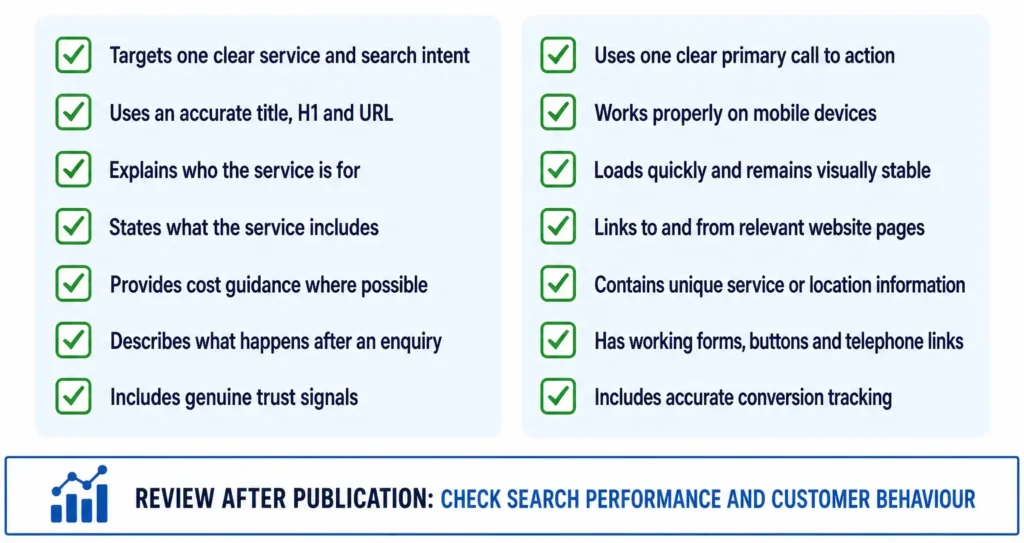
Before publishing, confirm that the page:
- Targets one clear service and search intent
- Uses an accurate title, H1 and URL
- Explains who the service is for
- States what the service includes
- Provides cost guidance where possible
- Describes what happens after an enquiry
- Includes genuine trust signals
- Uses one clear primary call to action
- Works properly on mobile devices
- Loads quickly and remains visually stable
- Links to and from relevant website pages
- Contains unique service or location information
- Has working forms, buttons and telephone links
- Includes accurate conversion tracking
Review the page after publication. Search performance and customer behaviour will show where further improvements are needed.
FAQ
How long should an SEO service page be?
There is no required word count. The page should be long enough to explain the service, answer important customer questions and provide evidence without repeating itself. A straightforward local service may need less content than a complex commercial or professional service.
Can one service page target several locations?
A page can explain a genuine service area covering several nearby locations. Separate location pages are only worthwhile when each contains useful local information, such as projects, reviews, availability or operating details. Avoid duplicating the same page and changing only the place name.
How many keywords should a service page target?
Start with one primary service topic and use closely related terms naturally. There is no ideal number of keywords or required keyword density. The page should cover the language and questions customers use without forcing phrases into every heading.
Should service pages include prices?
Provide fixed prices, starting prices or helpful cost ranges when the information can be stated accurately. If every project requires an individual quotation, explain what affects the cost and how customers can request an estimate.
How often should a service page be updated?
Review important service pages whenever prices, processes, availability, qualifications or service areas change. Also check their search and conversion performance periodically. Update the page when new information would make it more accurate or useful, not merely to change its publication date.
Build for Rankings and Real Customers
A successful service page connects a specific customer need with a clear and trustworthy offer. It explains the service, answers important questions, demonstrates experience and makes the next step simple.
SEO may bring someone to the page, but clarity and confidence turn that visit into an enquiry. Build for both, measure what happens and use real performance data to improve the page over time. If you want help improving service pages as part of a wider search strategy, see our SEO services for UK businesses.
Decide which page owns the service query before optimising it
One of the strongest current service-page SEO themes is page ownership. If the homepage, an old article and the service page all target the same commercial query, adding more copy to the service page may not solve the confusion.
For each high-value service, choose one primary URL and support it with internal links from related content.
Service-page SEO and landing-page CRO are related but not identical
Search needs a page that satisfies the query and has enough context to compete. Conversion needs a page that makes the offer, proof and next step clear. A strong service page does both without turning into either a keyword essay or a stripped-down ad landing page.
What should appear near the top?
For a commercial service page, answer these quickly:
- what the service is;
- who it is for;
- where it is available;
- what problem it solves;
- why the provider is credible;
- what the visitor should do next.
Do not hide the buying information Google users are looking for
Where appropriate, cover cost drivers, timing, process, eligibility, limitations and what is included. Competitors often rank because they answer the questions buyers ask before contacting anyone, not because they repeat the service keyword more often.
