
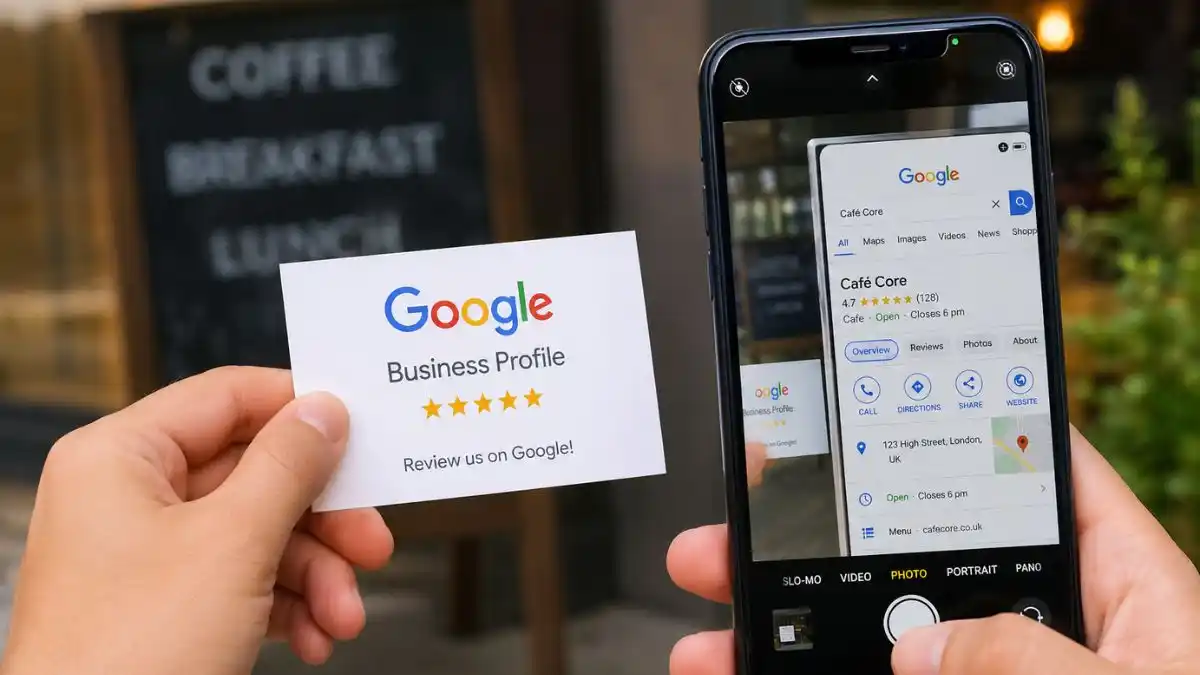
Imagine you’re looking for a nearby coffee shop, plumber, dentist or supermarket. Chances are, you won’t scroll through pages of search results. Instead, you’ll click one of the businesses that appears at the top of Google Search or on Google Maps.
Those listings come from Google Business Profile.
For millions of businesses, a Google Business Profile is often the first impression customers have before they visit a website, make a phone call or walk through the door. It displays essential information such as business hours, contact details, customer reviews, photos and directions, helping people decide whether a business is right for them.
Whether you run a local bakery, a law firm, a salon or a retail store with multiple locations, understanding how Google Business Profile works can make a significant difference to your online visibility. In this guide, we’ll explain what it is, how it works, why it matters and how to use it effectively.
What Is Google Business Profile?
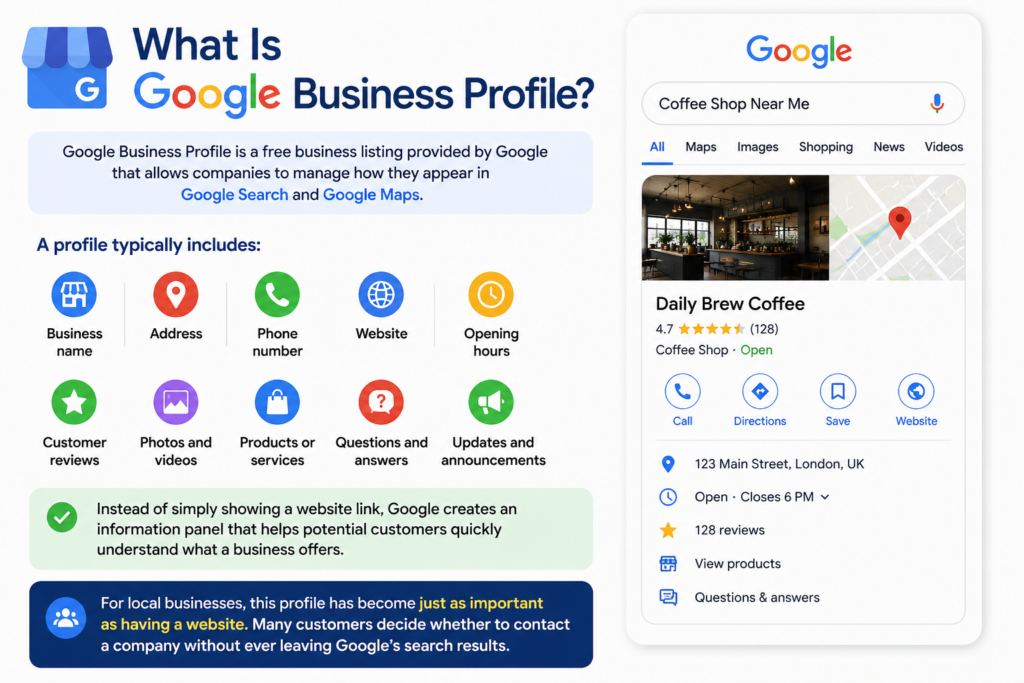
Google Business Profile is a free business listing provided by Google that allows companies to manage how they appear in Google Search and Google Maps.
A profile typically includes:
- Business name
- Address
- Phone number
- Website
- Opening hours
- Customer reviews
- Photos and videos
- Products or services
- Questions and answers
- Updates and announcements
Instead of simply showing a website link, Google creates an information panel that helps potential customers quickly understand what a business offers.
For local businesses, this profile has become just as important as having a website. Many customers decide whether to contact a company without ever leaving Google’s search results.
Why Did Google Create Business Profiles?
Google’s goal has always been to help users find the most relevant information as quickly as possible.
Years ago, searching for a local business usually meant visiting several websites before finding opening hours or a phone number. Today, most of that information appears directly in search results.
Google Business Profile was designed to make local searches faster and more useful. Instead of asking users to search multiple websites, Google displays key business details in one place.
This benefits everyone involved.
Customers find accurate information more quickly.
Businesses receive greater visibility.
Google delivers a better search experience.
It’s one of the reasons local search has become such an important part of modern digital marketing.
How Does Google Business Profile Work?
A Google Business Profile connects your business information directly to Google’s search ecosystem.
Once a profile has been created and verified, Google can display it whenever someone searches for:
- Your business name
- Your products
- Your services
- Businesses near a location
- General local searches
For example, if someone searches for:
“Italian restaurant near me”
Google analyses several factors before deciding which businesses to display.
These include:
- Relevance to the search
- Distance from the searcher
- Business reputation
- Review quality and quantity
- Completeness of the profile
- Overall prominence online
This information appears in what is commonly known as the Local Pack—the map and business listings shown above many organic search results.
If someone searches specifically for your business name, Google usually displays a larger Business Profile panel on the right-hand side of desktop search results or near the top of mobile results.
This allows customers to call your business, visit your website, check directions or read reviews without performing another search.
What Information Can You Add?
One reason Google Business Profile is so valuable is that it allows businesses to provide much more than basic contact details.
Depending on your business type, you can add:
Basic Business Information
Every profile should include accurate contact details, including:
- Business name
- Physical address
- Phone number
- Website
- Business category
- Opening hours
Keeping this information accurate is essential. Even small errors can frustrate customers and reduce trust.
Photos
Images are often the first thing people notice.
Businesses can upload photos of:
- Storefronts
- Offices
- Restaurants
- Products
- Staff
- Completed projects
- Interior spaces
Good photography helps customers know what to expect before they visit.
Customer Reviews
Reviews play a major role in helping customers make decisions.
People can rate businesses, write reviews and upload their own photos.
Business owners can also respond publicly to reviews, demonstrating professionalism and customer service.
Responding politely—even to negative feedback—shows that a business values its customers.
Products and Services
Businesses can showcase what they sell directly on their profile.
A florist might list bouquet collections.
A plumber can describe repair services.
A retailer can feature seasonal products.
This gives potential customers useful information before they even visit the website.
Updates
Businesses can publish updates about:
- Special offers
- Events
- New arrivals
- Holiday opening hours
- Company news
Regular updates help keep a profile active and informative.
Why Is Google Business Profile Important?
Many businesses spend considerable time improving their websites while overlooking the information customers see first.
Increasingly, that first interaction happens on Google rather than on the business’s own website.
A complete Google Business Profile helps customers answer important questions immediately:
- Are you open?
- Where are you located?
- Do you offer the service they need?
- What do other customers think?
- How can they contact you?
Removing these small barriers makes it easier for customers to choose your business.
For local companies, this can translate into more phone calls, more enquiries and more visits without increasing advertising spend.
Who Should Use Google Business Profile?
Almost any organisation that serves customers can benefit from having a Google Business Profile.
Examples include:
- Restaurants
- Cafés
- Retail stores
- Supermarkets
- Hotels
- Doctors
- Dentists
- Lawyers
- Electricians
- Builders
- Hair salons
- Gyms
- Car dealerships
- Accountants
- Real estate agencies
- Local manufacturers
- Service businesses
Even companies with multiple locations can manage each branch through separate Business Profiles, helping customers find the nearest location with accurate local information.
In short, if customers search for your business online, a well-managed Google Business Profile is one of the easiest ways to help them find you.
What Are the Main Features of Google Business Profile?
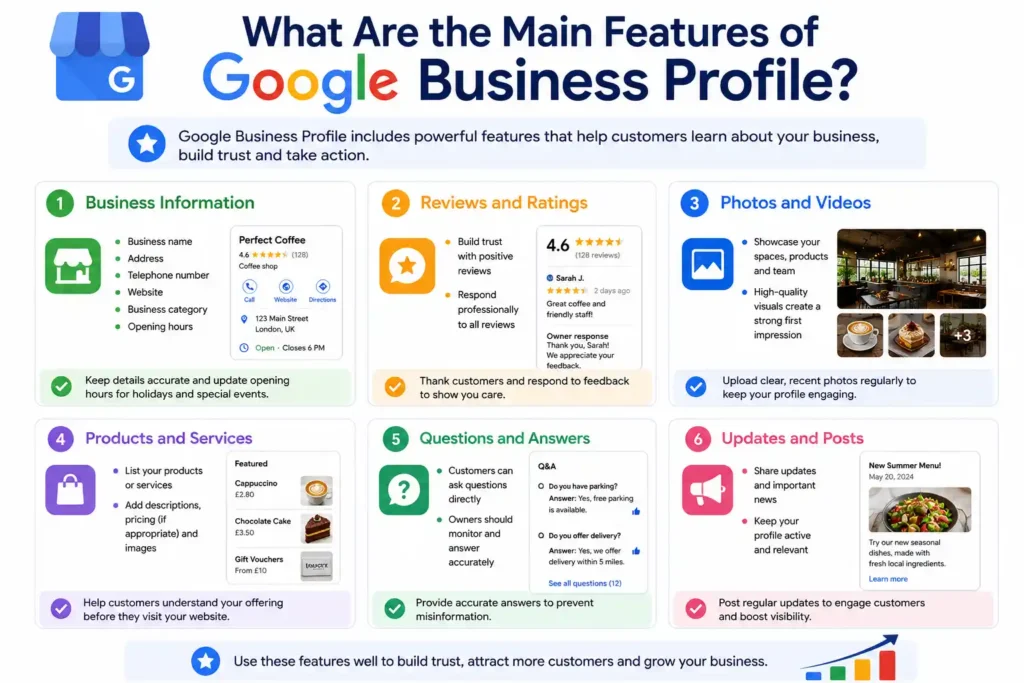
A Google Business Profile does much more than display a business name and phone number. It includes a range of features that help customers learn about a business before making contact.
Using these features well can improve customer confidence and make your listing more useful.
Business Information
Your profile should always include accurate business details.
This includes your:
- Business name
- Address
- Telephone number
- Website
- Business category
- Opening hours
If your opening hours change during holidays or special events, updating them promptly helps avoid disappointing customers.
Reviews and Ratings
Customer reviews are one of the most influential parts of any Business Profile.
People often compare several businesses before making a decision. Positive reviews can reassure potential customers, while thoughtful responses to criticism show that a business takes customer service seriously.
It’s good practice to thank customers for positive feedback and respond professionally to negative reviews. Avoid arguments or defensive replies, as these are visible to everyone.
Photos and Videos
People are naturally drawn to visual content.
A restaurant can showcase its dining area and menu items. A hotel can highlight guest rooms. A retailer can display new products or seasonal collections.
Businesses that regularly upload high-quality photos often create a stronger first impression than those with outdated or limited images.
Products and Services
Google allows many businesses to list products or services directly within their profile.
Instead of simply saying what you do, you can provide brief descriptions, pricing where appropriate and supporting images.
This helps customers understand your offering before they visit your website.
Questions and Answers
Customers can ask questions directly on a Business Profile.
For example:
- Do you have parking?
- Are pets allowed?
- Do you offer delivery?
- Are appointments required?
Business owners should monitor this section regularly and provide accurate answers before incorrect information is shared by others.
Updates and Posts
Google Business Profile also lets businesses publish updates.
These can include:
- New product launches
- Seasonal promotions
- Company announcements
- Community events
- Holiday opening hours
While posts don’t replace social media, they keep your profile fresh and demonstrate that the business is active.
What Are the Benefits of Google Business Profile?
Many business owners assume Google Business Profile is simply another online directory. In reality, it can influence how customers discover and evaluate a business.
Better Local Visibility
When people search for businesses nearby, Google often displays a map with several local listings before traditional search results.
Appearing in these results can increase visibility among customers who are actively looking for products or services.
For many businesses, these searches generate highly qualified leads because the customer already intends to buy or visit.
Increased Customer Trust
A complete profile gives customers confidence.
People are generally more comfortable contacting businesses that provide:
- Verified information
- Recent reviews
- Current opening hours
- Clear photographs
- A professional online presence
An incomplete listing, by contrast, may appear neglected or outdated.
More Phone Calls and Website Visits
Business Profiles make it easy for customers to take action.
With a single tap or click, users can:
- Call your business
- Visit your website
- Request directions
- Read reviews
- View products
- Check opening hours
Reducing the number of steps often leads to higher customer engagement.
Improved Mobile Experience
Most local searches now happen on smartphones.
Someone searching while travelling, shopping or commuting usually wants information immediately.
Google Business Profile is designed for this behaviour, allowing customers to contact businesses quickly without navigating multiple websites.
How to Create a Google Business Profile
Setting up a Business Profile is straightforward, but accuracy is essential from the beginning.
Step 1: Sign In with a Google Account
Visit the Google Business Profile website and sign in using a Google account associated with your business.
If you don’t already have one, you’ll need to create one first.
Step 2: Enter Your Business Information
Google will ask for key details such as:
- Business name
- Business category
- Address
- Service area if applicable
- Contact number
- Website
Choose the business category carefully, as it helps Google understand when your business should appear in search results.
Step 3: Verify Your Business
Verification confirms that you own or manage the business.
Depending on your business type and location, Google may verify your profile through methods such as:
- Video verification
- Phone verification
- Email verification
- Postcard verification
- Live video call
The available verification options vary, and Google determines which methods are offered.
Step 4: Complete Every Section
Many businesses stop after verification.
That’s a missed opportunity.
Complete as many profile sections as possible, including:
- Business description
- Services
- Products
- Opening hours
- Photos
- Company logo
- Attributes
- Appointment links where relevant
A complete profile provides customers with more useful information and presents a more professional image.
Tips for Optimising Your Google Business Profile
Creating a profile is only the beginning. Keeping it updated helps maintain its usefulness over time.
Keep Your Information Accurate
If your phone number, address or opening hours change, update your profile immediately. Outdated information can frustrate customers and damage trust.
Upload New Photos Regularly
Fresh photos show that your business is active.
For example, retailers can upload seasonal displays, restaurants can feature new menu items and service businesses can showcase recent projects.
Encourage Genuine Reviews
Satisfied customers are often happy to leave reviews if asked politely.
Never purchase reviews or offer incentives in exchange for positive ratings. Authentic feedback is far more valuable and complies with Google’s policies.
Respond to Customer Feedback
Whether a review is positive or negative, responding professionally demonstrates that you care about customer experience.
A thoughtful response can leave a positive impression even on people who never write reviews themselves.
Review Your Profile Frequently
Check your profile every few weeks to ensure all information remains accurate. Small updates made regularly are easier than correcting months of outdated information later.
Common Google Business Profile Mistakes to Avoid
Even businesses that have claimed their profile can miss opportunities by overlooking simple details. Avoiding a few common mistakes can help keep your listing accurate, professional and useful.
Leaving Information Incomplete
An unfinished profile gives customers very little to work with.
If your business hours, phone number or website are missing, potential customers may move on to a competitor with a more complete listing.
Using Outdated Business Information
Businesses relocate, change phone numbers and adjust opening hours more often than many owners realise.
If your profile doesn’t reflect these changes, customers may arrive at the wrong location or call an old number.
Review your profile regularly, especially after making operational changes.
Ignoring Customer Reviews
Reviews are part of your public reputation.
Thank customers for positive feedback and respond politely to criticism. A calm, professional reply often says more about your business than the review itself.
Uploading Poor-Quality Photos
Dark, blurry or outdated images don’t create a good first impression.
Clear, well-lit photos of your premises, products and team help customers feel more confident about visiting or making contact.
Choosing the Wrong Business Category
Your primary category helps Google understand what your business does.
Selecting an unrelated category may reduce your chances of appearing in relevant local searches.
Choose the category that best describes your main service, then add additional categories where appropriate.
How Does Google Business Profile Help Local SEO?
Local SEO is the process of improving a business’s visibility in location-based searches.
Google Business Profile plays an important role because it gives Google verified information about your business and helps connect that information with local search queries.
When someone searches for services nearby, Google considers several factors before displaying local businesses.
Relevance
Google looks at how closely your Business Profile matches the user’s search.
A detailed profile with accurate categories, services and descriptions makes it easier for Google to understand what your business offers.
Distance
Search results often depend on where the customer is located.
A nearby business may appear higher in local results than one several miles away, even if both offer the same service.
Prominence
Prominence reflects how well known and trusted a business appears online.
Google may consider factors such as:
- Customer reviews
- Review ratings
- Business information
- Links from other websites
- Overall online presence
While no business can control every ranking factor, maintaining a complete and active profile supports stronger local visibility over time.
FAQ
Is Google Business Profile free?
Yes. Creating and managing a Google Business Profile is free.
Businesses do not pay to appear in Google Search or Google Maps through a Business Profile.
Do I need a website?
No.
A website is highly recommended because it provides more information about your business, but it isn’t required to create a Google Business Profile.
Many small businesses receive calls and enquiries directly from their profile.
Can online-only businesses have a Google Business Profile?
It depends.
Businesses that serve customers in specific service areas—such as plumbers, electricians or cleaning companies—can create a profile without displaying a public storefront.
However, purely online businesses without face-to-face customer interaction generally aren’t eligible for a Google Business Profile.
How long does verification take?
Verification times vary depending on the method used.
Some businesses are verified within minutes, while others may take several days.
How often should I update my profile?
Review your profile regularly.
Update it whenever your opening hours, contact details, products or services change.
Adding new photos and responding to reviews throughout the year also helps keep your profile current.
Final Thoughts
Google Business Profile has become one of the simplest and most effective ways for businesses to improve their online presence.
It helps customers find accurate information, compare local businesses and make informed decisions without leaving Google Search or Google Maps.
For business owners, maintaining an up-to-date profile doesn’t require a large marketing budget or advanced technical knowledge. Small improvements—such as accurate opening hours, recent photos and timely responses to customer reviews—can make a meaningful difference to how people discover and trust your business.
As local search continues to evolve, businesses that keep their Google Business Profile complete, accurate and regularly updated will be in a stronger position to attract nearby customers and remain visible where buying decisions often begin.
